I’m gonna throw this up here because I’ve already gotten a TON of good feedback and asks for this project to happen. Let me know what I can do to get your archives to you. I’m being as transparent as I can. I want to save our history, because I’ve seen it vanish too many times. Thanks guys for helping us save our history. This is going to be an open offer to archive whatever blogs you can give me permission to archive, but support is nice.
Seeing as it’s probably going to be hard to find everybody we follow’s “find me here” posts, especially when people start deleting their blogs, I’ve set up a public spreadsheet so we can all keep track of each other if we migrate to different platforms, no matter where to.
The Clone Wars/Prequels fandom is small enough as it is, and I have really loved befriending this ridiculous hilarious fandom. I would absolutely hate to wake up and find out that people have disappeared and I can’t find them again.
THIS IS OPEN TO EVERYBODY IN THE CLONE WARS/PREQUELS FANDOM.
Participation is voluntary, fill out to your comfort level. Please signal boost/pass this along to your friends so we don’t lose each other!
Fandoms should organize a non-Tumblr but otherwise multi-platform art-and-ficathon for the 17th. Whatever your flavor of alternate social media to Tumblr, gather there with your co-follows and have yourselves a party!
In case you’re not aware, Tumblr has recently announced that on the seventeenth of December they’ll start purging all porn and porn-adjacent content on Tumblr. Why does that matter to LWU, you ask? Well, they’re using their bots to identify it, and we’ve all seen how well THAT works. One of my Wander posts even got flagged as sensitive for no apparent reason. What I want to do is reassure you all that I’ve taken steps to back up all of the content on LWU to my hard drive using a tool I was recommended a couple weeks ago. I’m going to continue to do so on a regular basis just in case, so there’s very little chance that my stuff will be lost.
I’m using this one! It condensed my entire blog as of November 20th into one 4.36 gigabyte folder.
Any notes on how to use it? I can’t figure it out.
Okay, so here’s how to do this.
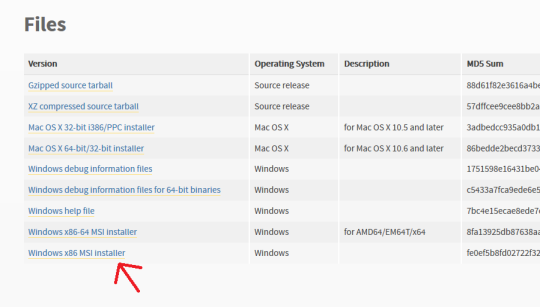
First off, go here and make sure you have Python installed. For Windows it should be the very bottom link, the x86 MSI Installer. You don’t have to do anything but install it.
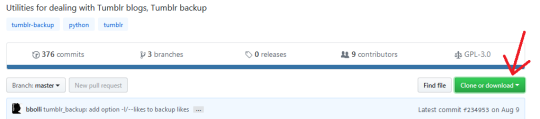
Second, go here, and click “Clone or Download” (the green button on the right). Select “Download ZIP”.
Make sure you have WinRAR or 7zip or something installed that lets you extract zip files.
Next, make a folder on your desktop. I named mine “Tumblr Backup”, and in the following instructions I’m going to assume that’s what you’ve named yours as well; replace “Tumblr Backup” with whatever you name yours if it isn’t.
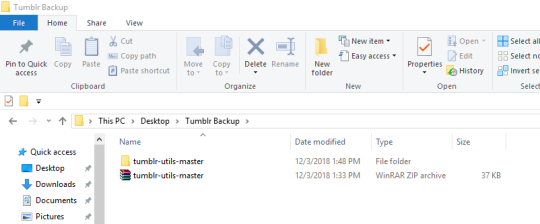
Drop the zip file you downloaded into Tumblr Backup. Go in and extract it; this should create a folder called “tumblr-utils-master“.
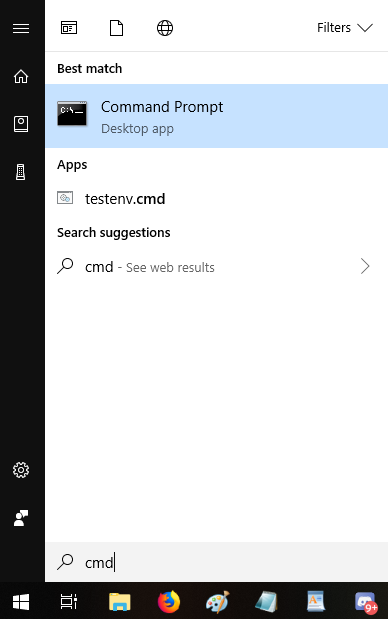
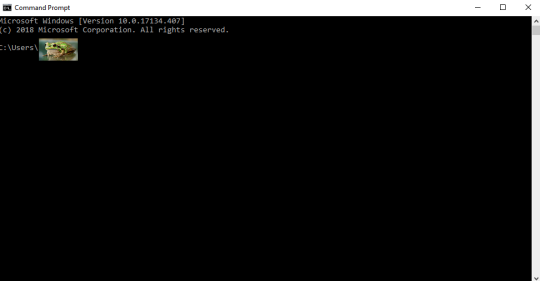
Open your Command Prompt. If you don’t know how to find that, click your start menu button and type “CMD”, which should give you this:
That should open this:
That frog over there is blotting out my profile name on my computer. Whatever your profile name is when you sign in (e.g. “Max” or “Snugglebuns” or “froglord69”) is going to be in that spot on the address path. If it instead says something about Windows and System 32, that’s okay, what I’m gonna tell you to do will go to the right place either way.
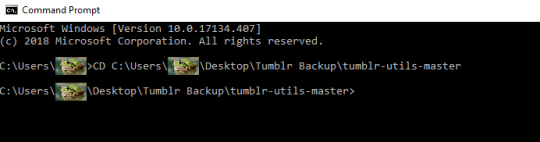
Next, input this command–keeping in mind that the parts in bold should be changed based on your profile name and what you named the folder on your desktop:
CD C:Usersfroglord69DesktopTumblr Backuptumblr-utils-master
There! Now you’re in the right folder! Next, enter this command, replacing the bolded bit with your own blog name:
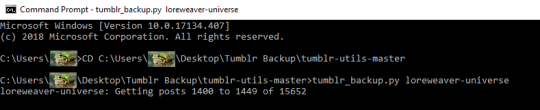
tumblr_backup.py yourblogname
You should see this:
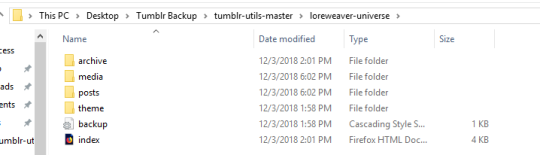
Then just…let it run! It took less than five minutes for my computer, though it will vary by processor and connection. Once it’s done, you’ll have something like this:
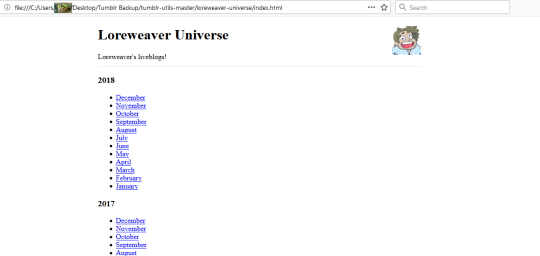
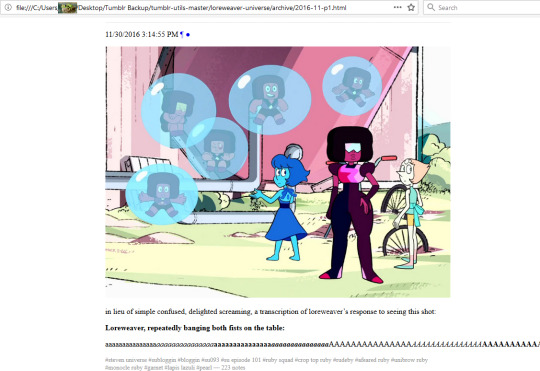
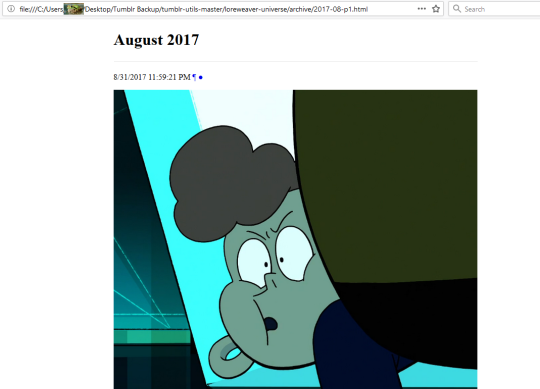
That “index” opens in an internet browser. It’s basically a webpage stored directly on your computer. Some pics of mine:
So…not pretty, but it’ll save the content of your posts. Hope this helps!
Spread this so as many people as possible can see it
Mac users:
Create a folder somewhere convenient and name it something like ‘Tumblr Backup.’
Download the script as described above. Save it to the folder you just created. Double click it, and it extracts in place.
open a terminal.app window. Terminal.app is located in your /Applications/Utilities folder. Usually, just typing command-space to bring up the spotlight window and then typing in ‘term’ and hitting return does the trick.
If you are not accustomed to UNIX command prompts, do not be scared. You got this.
At the ‘$’prompt, type in ‘cd’ and then space, and then drag and drop the decompressed tumblr-utils-master folder onto the terminal window. The path to that window should appear. Hit return.
Boom. You’ve switched to that folder. Type ‘ls’ to make sure. Should look like a list of the folder’s contents.
Type ‘./tumblr_backup.py [yourblogname]’ and hit return.
Boom. Your blog starts downloading. Go drink coffee, enjoy some porn, hang out with your dog, cat, other pet, or lover/s who may also be your pet/s, and let the script run. Depending on your connection speed and just how much of a pervert you are, this could take a while.
Mac instructions for you weirdo Mac users!
Oh thank gods, I needed those mac instructions. THANK YOU.
Yay for Mac instructions! Thank you, @montecervesa for posting them!
You ever write up a post you decide will be too controversial or embarrassing but leave it in your drafts to sleep on and then forget about it? How about real personal stuff you weren’t sure you wanted to share at the time? Heavy-ass receipts on bad shit you’re leaving there only just in case you’re forced to use them?
Well if any of your drafts get flagged by the new system, a mod can apparently see them in with all your other flagged posts, and if they un-flag them, it publishes them automatically as a brand new post. MERRY CHRISTMAS!!!!
First, a note: I ask that people please reblog this to spread this since the tags are kinda unusable right now, especially when a post has external links within it.
Dreamwidth has been my main active posting platform for a year and a half now, and I’ve noticed a lot of bloggers talking about jumping ship over to DW with tumblr’s uhhhhhh current state of affairs.
But DW is kinda bland and boring if you’re too young to have been of the LiveJournal generation, and therefore don’t know where to look or start in order to build your friends list and find communities, so I’m going to do some of the legwork for you.
the_great_tumblr_purge: I made a dw community specifically for people jumping ship from tumblr to reconnect with each other.
addme: a friending community where you pimp yourself out and find other people with similar interests that you might want to see on your reading page.
addme_fandom: similar to above, only with a stronger emphasis on finding people based on your fandoms.
fandomcalendar: a community where you can find fandom events, such as big bangs, exchanges, challenges, bingos, etc. and other fandom communities that might suit your interests.
tumblr is silently shadowbanning posts based on unknown criteria (unlikely to be image-matching, we suspect text content). Affected posts appear on dash and dash-like views, but not on the actual blog page as seen by other users. I have been able to see the effect personally on desktop. Almost certainly related to the gutting of the chronic pain tag and similar hits previously.
There is no red warning bar and no way to dispute a shadowban.
@thebibliosphere – this might explain some of your reblogs showing up for some people and not on your blog proper?
If you’re like me, you’ve been waiting for this moment since, oh, probably May 10th.
Sign-ups for SWBB 2019 are now open and this year we’re using a fancy new Google Form to get everyone situated. You can find that here: https://goo.gl/forms/gjOxoMCPxZ0hzK4y2. Author sign-ups close December 29th.
Dates (and hopefully a FAQ!) are coming soon; your mod got caught up preparing for NaNoWriMo and November snuck up out of nowhere. Such is life.
Interested in doing our banner art this year? Ping swbigbang@gmail.com and prepare to be glomped. Feel free to ask any questions at that address or by submission to this tumblr (response times will vary).
To our old and returning friends–good to see you again! To our new ones, welcome! May the Force be with you all!
So clearly I didn’t do the queue thing right. This was supposed to be reblogging all this month…
SWBB
2019 is NOT canceled with all the tumblr weirdness going on lately! We
run on email (swbigbang@gmail.com) and AO3–tumblr is mostly an
advertising platform that I am admittedly very bad at.
Doesn’t matter if you’re in the fandom or not–there was only one name fitting for the first one.
Rowena
A-grade Kyanite, Pyrite, Pyrite-infused Lapis Lazuli, A-grade Lapis Lazuli, and gold-brushed stainless steel on 49-strand coated stainless steel wire with a stainless steel hook & eye clasp. Length: 22″
Pendant hangs on a stainless steel bail and is 2″ in length.
$75.00 USD + Shipping ($4.99 First Class US; $7.99 First Class International*)
Joy is going to give me SUCH a look for this one’s name:
Scottish Weather
Smokey Agate gemstone drops with Fire-polished Crystal on Stainless Steel with Hypoallergenic Stainless Steel Posts. Just under 2″ in length.
$25.00 USD + Shipping
($4.99 First Class US; $7.99 First Class International*)
*Last time I shipped to Germany at this weight, it was drastically different than expected. If it costs more to ship to your country, we’ll discuss it, but I’m hopeful this is a worldwide rate. Granted Australia will probably decide it has to be special and expensive, as usual.
Email me at deadcatwithaflamethrower at gmail (dot) com if you’re interested!
Also Still Available:
Stellar, Take 2
Stainless Steel Round Pendant on Velvet braided with a Rhinestone Chain, 15″ Choker, $25.00 + Shipping
Weightless
Gold-plated Steel and Fire-polished Crystal on Gold-plated Brass Wire with Gold-plated Sterling Silver Hooks, 2.5″ in length, $25.00 + Shipping
Getting on towards the end of November 2018′s Shiny Offerings!
Today I did a semi-commission piece for @lferion, as she has dibs after missing out on the previous four. If she decides she doesn’t want it, I’ll post that and other shinies tomorrow.
Tonight is earring night! I haven’t done earrings in a while. These turned out awesome.
Secrets
Silver-plated and hammered Stainless Steel Ring, Lampwork Glass, Gold-plated Stainless Steel & Gold-plated Brass (for stringing the glass), on hypoallergenic Stainless Steel Fishhooks with Gold-plated Stainless Steel highlights. Measures 1.75″ from top of fish hook to bottom of the ring.
(Yes, they’re Slytherin-themed. How could you tell?)
$25.00 USD + Shipping ($4.99 US First Class; $16.99 USPS International)
Weightless
Gold-plated Stainless Steel, Gold-plated Brass (wire), and Fire-polished Crystal on Gold-plated Sterling Silver Fish Hooks. Measures 2.5″ from top of fishhook to bottom of gold charm. (The Gold-plated Stainless Steel charms are hollow, so there isn’t any extra weight to carry around.)
It is a pain in the ass to get good photos of fire-polished crystal. Those in the photograph swirl from blue to green and back again with hints of gold and violet beneath.
$25.00 USD + Shipping
($4.99 US First Class; $16.99 USPS International)
Email me at deadcatwithaflamethrower @ gmail dot com if you’re interested!




 There's a Mirror on the Wall